Best ChatGPT PDF Plugin in 2025: Why AskYourPDF Research Assistant Leads the Pack
Looking for the best ChatGPT PDF plugin? Learn how AskYourPDF handles long documents accurately, compares to others, and simplifies PDF research.
If you’re searching for the best ChatGPT PDF plugin, you want one thing: a tool that can handle long documents without missing the details that matter. AskYourPDF Research Assistant does exactly that. It reads your files accurately, gives clear answers, and makes working with heavy PDFs a lot easier.
In this article, you’ll learn:
- What AskYourPDF Research Assistant is
- How it works
- The features that set it apart
- How to use it for different types of documents
- How it compares with other ChatGPT PDF plugins
Why ChatGPT PDF Plugins Are Important
PDFs aren’t getting shorter, and most of us don’t have hours to comb through reports, research papers, or technical documents. A strong ChatGPT PDF plugin helps you work smarter by pulling out the information you actually need, fast and accurately.
Here’s why tools like this are useful:
- They save time by helping you jump straight to the sections that matter.
- They reduce errors by providing consistent, text-based answers rather than relying on guesswork.
- They make complex documents easier to understand, especially legal, academic, or technical content.
- They help with research by letting you ask questions and get precise responses.
- They keep everything in one place, so you’re not switching between different apps or tools.
In short, a good ChatGPT PDF plugin does the heavy lifting for you. It helps you work through long documents with clarity and confidence. That's hard to achieve on your own when you’re racing against time.
Why Not Just Use ChatGPT as a Research Assistant?
Why not just use ChatGPT directly for your PDFs? After all, it can answer questions and summarize text. The challenge is that ChatGPT is a general-purpose tool. It isn’t designed to work specifically with documents, so when you try to use it on a PDF, it often falls short.
Some common issues include:
- Forgetting content: After a few interactions, it may lose track of what’s in the PDF.
- Limited depth: Its responses are general, which can make detailed analysis or research unreliable.
- No document context: ChatGPT doesn’t retain the structure or references from your PDF, making it hard to follow complex reports or research papers.
AskYourPDF Research Assistant solves these problems. It’s built to stay anchored to your PDF, handle long documents, and give precise, consistent answers every time. That means you get reliable research support without having to remind it what’s in the file.
What Is AskYourPDF Research Assistant?
AskYourPDF Research Assistant is an AI tool designed to help you get answers from your PDFs without digging through every page yourself. It's just like a human assistant who sits with your document, understands what’s inside, and tells you exactly what you need to know when you ask.
You upload a file, and it becomes your personal guide through that document. Instead of scanning page after page, you can ask direct questions — “What does this section mean?”, “What are the main findings?” “Where did the author mention this topic?” — and get clear responses based on the actual content in front of it.
It works well for all kinds of documents ,including school materials, research papers, contracts, manuals, business reports, proposals, and even long ebooks. If the document is dense or time-consuming, this tool helps you make sense of it without getting stuck or overwhelmed.
In simple terms, AskYourPDF Research Assistant takes the pressure off reading heavy PDFs and helps you pull out what matters, when it matters.
How AskYourPDF Research Assistant Works
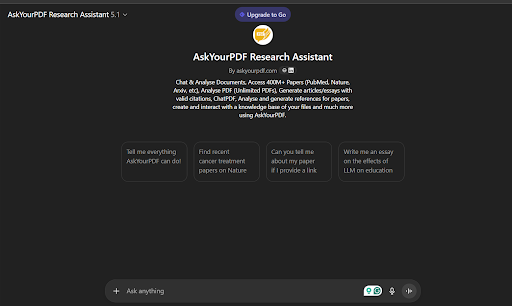
AskYourPDF Research Assistant is built to make working with PDFs simple. Once you open the AskYourPDF page and select “Try our assistant,” you’re taken directly into ChatGPT, where the plugin automatically activates.
Inside ChatGPT, the assistant’s capabilities are listed clearly. It can analyse your documents, access over 400 million research papers from sources like PubMed, Nature, and arXiv, review unlimited PDFs, generate articles or essays with proper citations, create references, and help you build a knowledge base from your files.
From there, you choose how you want to work:
- Upload your own PDF if the document is unique to you.
- Search for an existing published PDF if the file is already available online.
Once your document is loaded, you simply interact with the assistant the same way you use ChatGPT. Ask questions, request summaries, clarify sections, or pull out specific details. The tool reads your PDF directly and responds based on its content.
The process is straightforward and requires no special setup. Open the assistant, select your file, and start asking for what you need.
Unique Features of AskYourPDF Research Assistant
AskYourPDF Research Assistant stands out because it’s designed to accelerate research, analysis, and document review while making them more reliable. Here are the features that set it apart:
- Unlimited PDF Analysis – Work with as many PDFs as you need, without restrictions.
- Access to Millions of Research Papers: Search through PubMed, Nature, ArXiv, and more to complement your research.
- Accurate Summaries and Insights: Pull key points, summaries, and detailed answers directly from your PDFs.
- Generate Articles and Essays with Valid Citations: Create content based on your documents without worrying about missing references.
- Reference and Citation Management: Analyse papers and generate accurate references automatically.
- Knowledge Base Creation: Build and interact with a personal database of your files for quick future access.
- User-Friendly Chat Interface: Everything happens inside a ChatGPT-like interface, making it intuitive to ask questions and get results.
These features make it a tool you can rely on, whether you’re a student, researcher, or professional handling complex reports. It’s focused, precise, and built to keep your research organized.
How to Use AskYourPDF Research Assistant
AskYourPDF Research Assistant works wherever detailed PDFs are involved. Here’s how it can help in different scenarios:
Academic Research
AskYourPDF Research Assistant makes academic work faster and more precise. Instead of reading through long papers or theses, you can ask the assistant to extract key points, summarize sections, or highlight references. It helps you quickly gather insights for essays, projects, or literature reviews, letting you focus on analysis rather than skimming. For students and researchers, it turns hours of manual reading into minutes, while ensuring that nothing important is missed.
Business Reports
Handling large business reports, market research, or financial statements can be overwhelming. AskYourPDF can analyze these documents, highlight key trends, extract actionable insights, and summarize findings in plain language. Whether you need a quick overview or detailed data, it makes report review faster and more efficient. Decision-making becomes easier because you can focus on the information that matters most without getting lost in pages of tables, graphs, or lengthy explanations.
Legal Documents
Legal contracts, agreements, and case files are often long and dense. AskYourPDF Research Assistant helps you navigate these documents quickly by pointing out relevant clauses, summarizing sections, or clarifying terminology. It ensures you don’t overlook critical details like obligations, deadlines, or legal conditions. Lawyers, paralegals, or business professionals can save time while improving accuracy, using the tool to review documents confidently without manually scanning every line or worrying about missing important content.
Long eBooks
For long eBooks, whether for study, research, or personal reading, AskYourPDF makes it easy to locate topics, summarize chapters, or pull out key ideas. You can ask questions, reference specific sections, or get concise overviews of themes without reading the entire book. This is particularly useful for students and lifelong learners who need to understand content quickly, extract quotes, or identify essential passages, turning potentially overwhelming reading into an efficient and organized process.
Invoice and Contract Review
Invoices, contracts, and financial documents often contain critical details buried in long tables or dense text. AskYourPDF lets you extract amounts, dates, clauses, and other essential information quickly and accurately. It helps professionals verify data, ensure compliance, or prepare summaries without manually scanning each page. By reducing errors and saving time, the assistant becomes an essential tool for accounting, legal, and administrative tasks that require attention to detail.
In each case, the tool works through a simple chat interface. You ask questions as you would in a conversation, and the assistant provides answers directly from the document. This approach keeps research and document review focused, efficient, and reliable.
AskYourPDF Research Assistant Pricing
AskYourPDF offers several pricing tiers depending on how much power and flexibility you need. Note that the pricing includes the whole AskYourPDF package:
- Free Plan – $0/month: Allows basic access with limited usage: up to 100 pages per document, 50 questions per day, and one document upload per day. This plan is ideal for trying out the tool or handling small files.
- Premium Plan – $11.99/month (billed yearly): A step up from the free tier with broader limits: up to 2,500 pages per document, 50 documents per day, 1,200 questions per day, and access to features like knowledge bases and OCR support.
- Pro Plan – $14.99/month (billed yearly): Designed for frequent or heavy users. It increases document size limits (up to 6,000 pages), allows up to 150 documents per day, and removes most usage caps. It also includes priority support and extended replies.
- Enterprise Plan – Custom pricing: Tailored solutions for teams or larger organisations with high-volume needs and unlimited usage. You must contact the AskYourPDF team for a quote
All paid plans typically offer discounts when billed annually, making them more cost‑effective than monthly billing.
Comparison Table: AskYourPDF vs Other ChatGPT PDF Plugins
| Tool | Description | Best For | Pricing |
| AskYourPDF Research Assistant | A document‑focused tool that lets you upload PDFs, chat about content, summarise text, access research papers, build knowledge bases, and extract insights directly from your files. It integrates seamlessly through ChatGPT. | Students, researchers, writers, and professionals dealing with long or complex PDF documents. | Free plan: $0/month Premium: $11.99/mo Pro: $14.99/mo Enterprise: Custom pricing. |
| ChatPDF | A simple online PDF chat tool that lets you upload and interact with PDFs, summarise content, and ask questions directly. Easy to use with a straightforward interface. | Casual users, students, and professionals who need quick summaries or simple Q&A. | Free plan: Available with limits Paid plan: Around $5/month for higher limits. |
| PDF.ai | A versatile PDF chat and analysis tool with OCR support, multi‑document chat, and higher usage limits on paid plans. Good balance of power and ease of use. | Users needing deeper document analysis, OCR support, and multi‑document workflows. | Pro: ~$10/mo Ultimate: ~$20/user/mo Enterprise: ~$30/user/mo. |
| ScholarAI | A research‑oriented assistant that summarises academic papers, helps with citations, and integrates research features. | Academic researchers and students focused on academic literature and citations. | Free plan: $0/mo Basic: ~$9.99/mo Premium: ~$18.99/mo (team plan via contact). |
| PDFgear | A free PDF reader and editor with an AI assistant built in. Lets you summarise, extract information, and handle PDFs while also providing editing tools. | Users who want both PDF reading/editing and basic AI summarisation for free. | Free: $0 (no paid tiers). |
Final Thoughts
AskYourPDF Research Assistant makes working with PDFs faster, easier, and more reliable. Whether it’s academic research, business reports, or legal documents, it gives you clear answers directly from your files.
Try AskYourPDF today and see why it’s the best ChatGPT PDF plugin for anyone who wants accurate insights without the hassle.