Precise list organizer with AI
AI Alphabetizer Tool
Easily organize lists with our free AI Alphabetizer. Simplify sorting with this user-friendly tool.
Overview
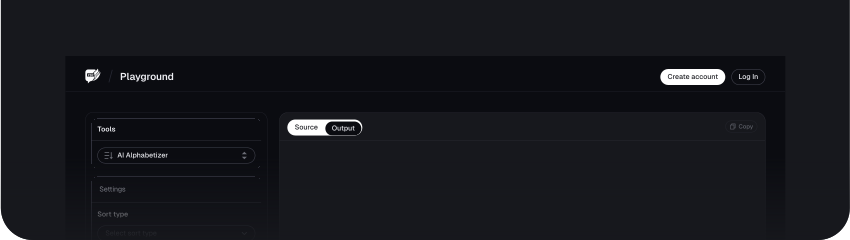
The Alphabetizer tool is an easy yet powerful tool for arranging lists of words, names, or other items in perfect alphabetical order. The tool is widely used in sorting contact lists, inventory, and bibliographies. Whether you have a small or large dataset, this Alphabetizer Tool makes it easier to keep your data in proper and efficient order.
One of the key strengths of the Alphabetizer Tool lies in its user-friendly interface, where you can quickly create your list and view it sorted with just a few mouse clicks. This tool is essential for the fast and efficient sorting of text information. It saves time by making the process automatic, improving the readability and accuracy of data immensely.
What is the Alphabetizer Tool?
An alphabetizer tool sorts lists of words or other items in alphabetical order. It can be a significant data organization tool for names, titles, or any alphabetical list.
Using the Alphabetizer Tool, you input your list, and it arranges it alphabetically from A to Z. It supports various formats, be it plain text or a spreadsheet. This tool is handy in making information easy to locate and systematically arranged.
Benefits of Using the Alphabetizer Tool
1. Saving Time
An Alphabetizer tool allows one to hasten the way lists are arranged alphabetically. Instead of manually sorting out items, which is pretty time-consuming, you can do the job quickly using this tool. It, therefore, comes in handy, especially when dealing with huge lists.
2. Improving Organisations
This tool helps keep your information well-organized by sorting items alphabetically, locating specific entries, and maintaining a structured approach to handling data become easier. This organization is beneficial for managing lists, directories, and other types of records.
3. Enhancing Readability
Alphabetically arranged lists are more readable and clear. You can quickly review items to get what you want when items are placed in order. Since the order improves readability, users can review the information conveniently and use it effectively.
4. Reducing Error
Manual sorting may result in human errors, such as losing important documents and duplication. This Alphabetizer Tool reduces those errors by giving a consistent, error-free ending product. It will ensure that lists are correct and free from errors.
5. Increases Efficiency
The Alphabetizer tool is very efficient since it automates the sorting process. It will allow you to do other important tasks while the tool organizes your data. Its efficiency is very near to being a help, specifically among professionals who handle huge amounts of information daily.
6. Supporting Various Formats
The tool can take various inputs, such as text files, spreadsheets, etc. It makes the tool versatile and caters to various needs and formats, providing a flexible solution for data organization in different contexts.
How to Use the Alphabetizer Tool
Step 1: Inputting Text
Input the text you want to alphabetize by directly typing it into the provided box.
You can also copy and paste the texts into the provided text
Step 2: Selecting Sorting Options
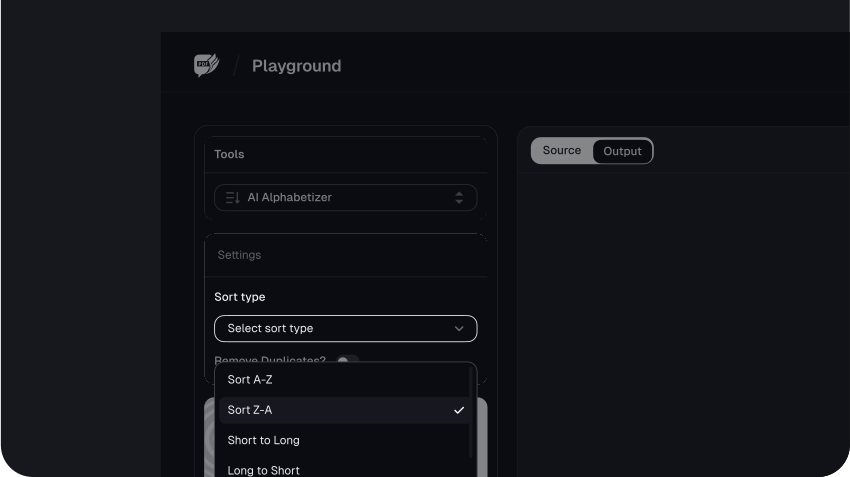
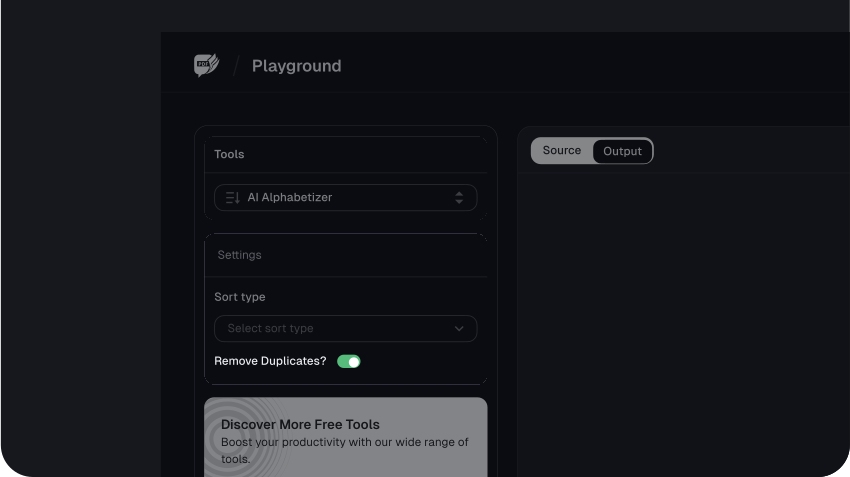
Once you’ve inputted or pasted the text in the provided box, scroll down a bit and choose a sorting option.
From the sorting option, you can choose whether you want to sort the list in ascending order (Sort A-Z), descending order(Sort Z-A), Remove Duplicates, Short to Long, and Long to Short.
Step 3: Review and Copy the Result
After choosing a sorting option, the AskYourPDF Alphabetizer tool will automatically sort the list and the output will replace the text you initially inputted.
Click on the copy icon to copy the alphabetized output.
Use Cases and Examples of the Alphabetizer Tool
1. Sorting Contact Lists
One of the most frequent uses of the Alphabetizer Tool is sorting contact lists. Whether it be a client list by name, employee records, or personal contacts, this tool can help you arrange them in order. For example, if you have a spreadsheet list of your customers' names, you can quickly rearrange them from A to Z, enabling you to find particular contacts more effectively.
2. Organizing Inventory Lists
A business often must maintain these lists in large inventory lists. The Alphabetizer Tool can sort these lists by product name to help better maintain the inventory. For example, a retail store's list of products should be put in alphabetical order for easy replenishment or when creating a catalog.
3. Organizing Bibliographies or References
The Alphabetizer Tool may help students and researchers organize bibliographies or reference lists. Academic papers usually require all references to be in alphabetical order. This tool will help you sort all sources perfectly, saving time and minimizing potential errors.
4. Preparing Meeting Agendas
When creating an agenda for a meeting, you should list a few topics or participants alphabetically. Use this Alphabetizer Tool to organize your agenda items or attendees to create a more organized and professional presentation.
5. Create Name Tags or Place Cards
This tool will be helpful for event organizers planning events like conferences, weddings, or seminars that involve alphabetically ordering names. Alphabetical ordering makes creating name tags, place-card labels, or seating arrangements for an orderly flow easy.
6. Compiling and Sorting Data for Reports
The Alphabetizer Tool will help in cases where reports contain lists or data. Suppose you have a report containing lists, such as departments or project names; arrange them alphabetically to make the report more readable and professionally presented.
7. Managing Book or Media Collections
The Alphabetizer tool can sort huge books, movies, or music collections. It is helpful for a book collector who wants a list of titles sorted in alphabetical order, either by author or title, to know their collection and find any piece therein.
Conclusion
The AskYourPDF Alphabetizer Tool is fantastic for anyone looking to alphabetize lists or data for whatever purpose. Whether you need it to manage your contact lists, prepare reports, or sort your bibliographies, this tool will simplify the process, save you time, and minimize common mistakes. It is easy to use and can handle various formats, making it versatile and adaptable to any needs.
The Alphabetizer Tool ensures your information is effectively organized by enhancing its readability and organization. This makes it a very efficient solution for those seeking to keep order and clarity of data in their personal and professional life.
FAQs
Explore more related tools
Enhance your writing with these complementary tools.

AI Instagram Name
Our AI Instagram Name Generator crafts catchy and personalised usernames for your social media presence.

AI Story Generator
Craft unique tales, explore diverse genres, and bring your narratives to life.

AI Thesis Generator
Craft concise, impactful thesis statements for your research effortlessly.

Reverse Text Generator
Our tool swiftly reverses text, generating backward results for a playful and unique touch to your content.