Smart PDF splitter powered by AI
AI PDF Split Tool
Divide PDF documents into separate files, saving you time and streamlining your document management tasks.
Overview
Dealing with large PDF documents is a common challenge people face. A PDF Split Tool will help you extract sections from a lengthy report or, quite the opposite, deal with multiple documents efficiently. This tool breaks huge PDFs into smaller parts so that handling, sharing, and printing become much easier—only those sections need to be attended to in the way you want.
If someone wants to split their PDFs, AskYourPDF.com provides a straightforward solution with the PDF Split Tool. You can break down your PDF into individual pages or extract parts that interest you within a few clicks. This tool will simplify everything for you so that you can easily manage all of your documents without downloading time-consuming software or applying complicated procedures. The PDF Split Tool helps you manage your PDF documents easily and securely from any device, be it a desktop, tablet, or smartphone.
What is a PDF Split Tool?
A PDF split tool is a software program or online service used to split a PDF document of your choice into small parts. Considering this, you have one huge PDF document that needs only some parts. You may separate them by page or number of pages that become easier to deal with, share, or print.
For example, if you have a PDF with 100 pages and all you need are pages 10 through 20, the PDF Split Tool assists in extracting those pages into a new, small PDF containing only that part. It helps save storage space and makes it more convenient to handle only relevant information.
The PDF split tool will also make your documents more organized. If you have big PDFs, creating smaller files from them helps organize and keep them in proper categories. It becomes more helpful when one works in a professional or educational environment, as the documents are often shared or stored digitally.
How to Use the PDF Split Tool
Step 1: Upload Your PDF
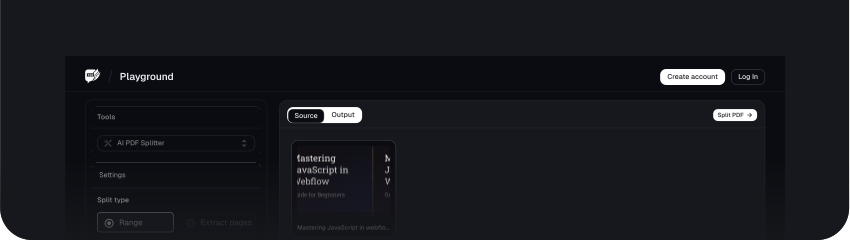
Click on the box to upload the PDF you want to split. You can also drag and drop the PDF file into the box to select it.
Step 2: Process the PDF Split
After uploading all your PDF files, click the Split PDF button to initiate the process.
You would need to exercise some patience and let the tool process the PDF file and split it.
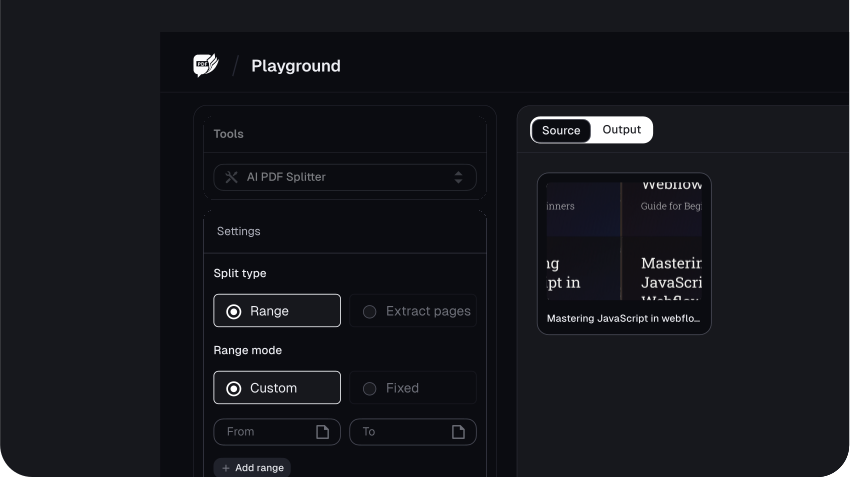
Step 3: Choose the Split Option
If you click on the Settings button, you can select how you want to split the PDF file.
You can choose from the following options: Split Selected Pages, Split PDF into equal parts, andSplit PDF every few pages.
Under the Split PDF every few pages option, you can choose from the three options: Every Page, Every 2 Pages, and Every 3 Pages.
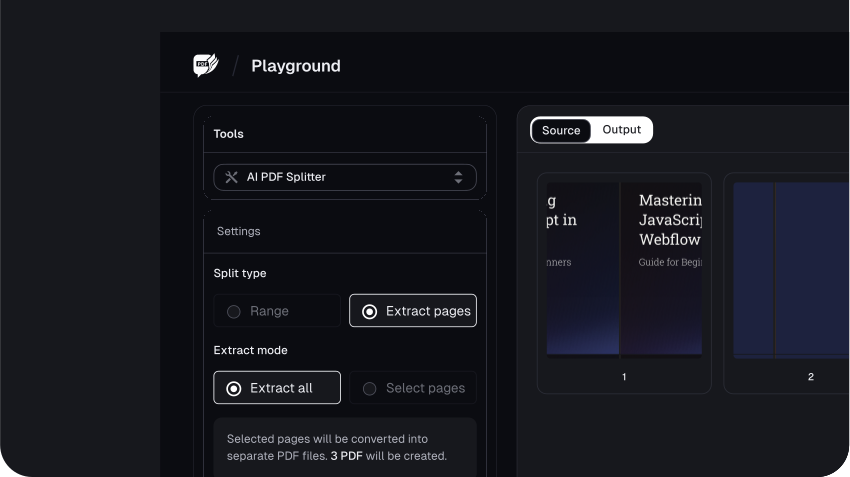
Step 4: Download the Output of the PDF Splitter
Once satisfied with the output, click Save at the top right corner of your screen to download the result from the AskYourPDF PDF split tool.
Benefits of Using the PDF Split Tool
1. Efficiency
The PDF Split Tool increases efficiency, especially when dealing with long PDF documents. The chief benefit is saving time, as one can split these files quickly into smaller sections, which are easier to work on. Users do not have to separate the pages or create multiple files manually; all this is automated by the tool and only takes a few simple clicks.
The tool's speed and functionality translate directly to user productivity. By handling the splitting process quickly, it saves time that can be spent on other things. It comes in handy, especially in professional places of work where effective time management is paramount. For example, if you have a long report or any big document from which you want to extract certain sections, the PDF Split Tool does this in just a few seconds without requiring manual intervention.
2. Ease of Use
The PDF Split Tool is user-friendly and easy to adapt, even for novice use. Its interface simplifies file splitting, making it easy and hassle-free.
The program's intuitive design ensures that it is very user-friendly. Most of the work involves only three basic steps: choose the PDF file, initiate the PDF split, and save the new documents. The clear instructions and easy-to-follow layout make the tool approachable even for the less tech-savvy.
This simple process not only saves time but minimizes the occurrence of errors. The user doesn't have to bother with too sophisticated settings or some advanced features that might be confusing; they simply get the job done using minimal time and effort. This versatile tool is recommended for side users handling PDF documents and users who treat them often.
3. Security
Document security is a key benefit of a PDF split tool. Almost all of these tools incorporate multiple state-of-the-art safety features that help them treat documents in an encrypted way, ensuring that your data is completely secured throughout the process. This becomes particularly applicable when treating sensitive or confidential information.
The encryption feature protects your file while it is being split so that no undesired entity can access its contents. Uploading it to an online tool or using software on your computer helps protect your information from any possible threats.
In addition, most PDF splitting tools have strict privacy policies and data protection measures. This guarantees that your documents are handled securely. In the case of online tools, files often get deleted from servers shortly after processing to protect a user's privacy further.
Features of the PDF Split Tool
1. Completely free service
Online PDF splitting is free of cost. You can split any PDF file according to single pages. No installation or email registration is required, and there won't be watermarks on your output PDF.
2. Bulk Splitting
This PDF split tool helps split many PDF files at once after running the program, saving time and effort. Select several PDFs; it will cleave them into singular pages or sections in one go. This feature is particularly useful when handling large volumes of documents, smoothing workflow, and making it more manageable.
3. No Download Required
Professionally, the PDF Split Tool is a lifetime software that will let you split your PDFs right in your browser. No software download is required. This makes it highly convenient and available 24/7—any device with access to the internet can use it without installations or storage problems. It's an instant, hassle-free solution for working with PDFs anywhere you want.
4. Split PDFs Page by Page
You can easily split a PDF by uploading it into the PDF split window. After that, you can divide the whole document into single-page PDFs or extract only the pages that interest you.
5. Works on Any Device
AskYourPDF is an online PDF extractor working with all major platforms—not only Windows and Mac but also Linux, Android, and iOS. It works on any other mainstream devices and doesn't need anything more than a web browser.
6. Intuitive PDF Splitting Process
AskYourPDF is a user-friendly platform where PDF documents can ultimately be split by page, saved by one single page from a PDF document, or retained as a portion of the pages from a PDF document as needed.
7. No Quality Loss
You don't have to be concerned about losing quality when you split PDF documents. This tool will ensure you will keep a pixel when dividing your PDF. All pages of your PDF are very clear and sharp, as bright as the original document.
Conclusion
The PDF Split Tool will become an essential resource for all those who regularly work with PDF documents. This tool simplifies managing large files by extracting, breaking, and arranging PDFs at the click of a button without compromising on quality.
Whether handling multiple documents at a time, working on the go, or simply ensuring that your data is safe, this tool provides the flexibility and convenience to help one meet their needs. With options like bulk splitting, no download requirement, or working across devices, the AskYourPDF.com PDF Split Tool is something one would always look up to handle your PDF files the way you want.
FAQs
Explore more related tools
Enhance your writing with these complementary tools.

AI Text Generator
Transform ideas into text effortlessly using AI Text Generator. Craft diverse, creative, and engaging content.

AI Paragraph Generator
Generate concise and coherent paragraphs, enhancing the clarity and impact of your content.

OCR PDF Reader
Transform scanned or image-based PDFs into editable and searchable text with our AI powered OCR PDF Reader.

Source Tool
Discover, analyse, and recommend sources of relevant to your needs.