Accurate character counter with AI
AI Character Counter Tool
A handy tool that counts your characters in a snap. Whether you're trying to fit your thoughts into a tweet or just keeping an eye on your word count, give it a go and see those numbers tick up in real-time.
Overview
A character counter tool is a simple and effective tool aimed at keeping work on writing tasks easier and more accurate. Whether posting on social media, composing an email, or optimizing a website's title tag, this tool easily keeps you within the character limit. Instant character counts in your text save you the time and effort that you would need to do manually and ensure your content fits the required guidelines.
The Character Counter Tool can do more than count. It's all-powerful for any user who manages text length on various platforms. Its user-friendly interface provides real-time end-user accuracy to help one avoid mistakes and stay on track towards writing goals. In this article, you'll learn how to use the AskYourPDF character counter tool.
What is a Character Counter Tool?
A character counter tool is a digital tool to monitor the number of characters within a text. It usually includes everything you type, including letters, numbers, spaces, punctuation marks, etc. Such a tool serves one of the principal purposes of securing your text to the demanded acceptable length in different situations, like writing social media posts, composing emails, titles, and descriptions of websites, etc.
For example, when tweeting or writing a Facebook post, you have a limit to how many characters you are supposed to use. It never feels good when your message is either curbed or refused to be posted. Use a character counter tool that works for you. It is pretty simple to use. You only have to paste or type your text into this tool, which will instantly show the number of characters.
Furthermore, some character counters also offer additional information—one example is the read time, number of words, number of sentences, and number of paragraphs. This is helpful when meeting requirements and needing to hit a word or sentence count in essays, articles, or reports.
How to Use the Character Counter Tool
Step 1: Input Your Text
To input your text, you can choose to type it directly into the provided box. You can also choose to copy and paste your text into the provided box. If you have a file in which you want to count the number of sentences, click the Upload File button and select the document you want to analyze its character count.
Step 2: Review the Character Count
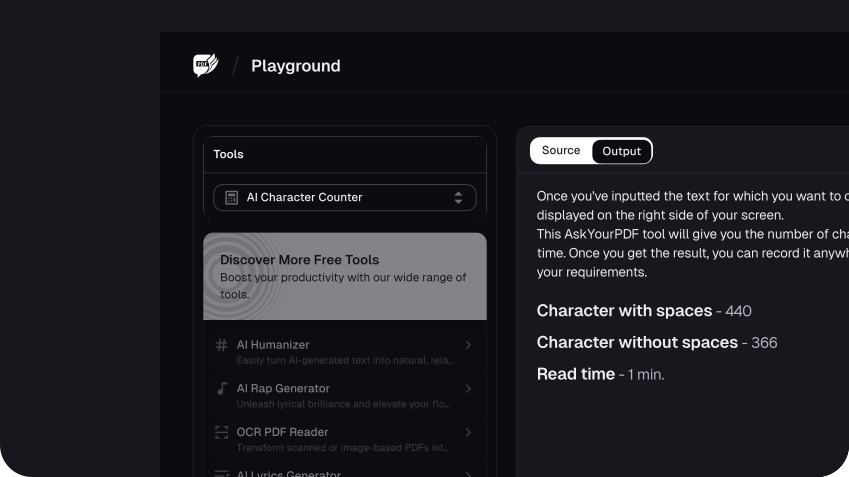
Once you've inputted the text for which you want to count the number of characters, the real-time character count will be displayed on the right side of your screen. This AskYourPDF tool will give you the number of characters with spaces, the number of characters without spaces, and the read time. Once you get the result, you can record it anywhere. After doing that, reviewing the count is important to ensure it meets your requirements.
Step 3: Adjust Your Text (If Necessary)
Once you’ve reviewed the character counter's output and the text exceeds the character limit, you can adjust it in the input box to match the required character count.
Benefits of Using the Character Counter Tool

1. Accuracy
An advantage of a character counter tool is its accuracy. It provides an exact count of characters in any text, whether a short social media post, a long article, or even mixed content containing both text and numbers. This level of accuracy is also important in cases where character limitation is crucial, such as when a user writes tweets, meta descriptions for websites, or messages with strict length requirements.
The tool eliminates the risk of human error, which can occur when counting characters in manual work. A small miscalculation and you might roll over, wherein your result will be an incomplete post or, worse, it will be rejected. Using a tool to count characters will ensure that the count is correct and that your text fits within the guidelines without guessing.
It also helps in situations where different platforms have their own character restrictions. This tool will provide an exact count, whether for Twitter, Facebook, or LinkedIn—any of these—so that you can regulate the text according to the limitations that apply to each platform.
2. Time-Saving
One of the major advantages associated with a character counter tool is time. Counting characters in text can be a chore and consume a lot of time, especially when accuracy is required. With a character counter tool, this happens in a snap.
As you type or paste your text, it will count the characters instantaneously. This is very good when you are on a tight deadline, such as revisions, or when you need to be within certain lengths in your text to follow specific guidelines, like social media posts, ad texts, and web content.
3. Convenience
Another benefit of using a character counter tool is its convenience. Its user interface makes it manageable and easy to operate by everyone, regardless of technical skills—no messing around with difficult menus and settings. Just type or paste your text inside the tool, and you'll get the results in seconds.
This simple process is highly user-friendly and saves much time and hassle. Whether you use a computer, tablet, or smartphone, this character counter tool is always at your fingertips and instant in its response—making it an excellent tool for casual users and professional Outlook users who need to monitor the number of characters being used continually.
4. Versatility
Another great advantage of using a character counter tool is its versatility. This makes the tool helpful in many other circumstances. The character counter tool will accommodate your needs, from social media posts to academic papers to professional document seeds.
This is a tool that allows social media users to make their posts within the required number of characters for the various platforms so that users can effectively deliver their message without the danger of truncation. It helps students or researchers in an academic environment with the required word or character count for essays, reports, or abstracts to ensure that their work conforms to the requirements of excellence.
The character counter tool is very much needed when professionals write an email, create marketing materials, or develop website content. It guarantees that every title, meta description, or other important element is within the optimal length for search engines or readability.
Conclusion
This tool saves your time and ensures that your content fits within the parameters so you can write clearly, concisely, and effectively every time. Whether you are a student, professional, or any other user seeking to improve writing efficiency, the Character Counter Tool can be useful in finishing the task at hand.
FAQs
Explore more related tools
Enhance your writing with these complementary tools.

AI Rewording Tool
Our AI Rewording Tool enhances clarity and style, maintaining your message with a fresh perspective.

Fancy Text Generator
Add unique symbols and icons for a touch of flair and individuality. Express yourself creatively.

Small Text Generator
Our tool converts normal letters into small caps, subscripts, and superscripts, adding a unique touch to your text.