Efficient text repeater with AI
AI Text Repeater Tool
Upload documents and specify the desired repetition for easy duplication.
Overview
The Text Repeater Tool is a simple, compact, and handily contrived digital utility developed to help users create multiple copies of any text without manually typing or repeatedly copying anything themselves. This tool comes in handy for duplicating anything from words to phrases to symbols and even emojis, saving quite a great deal of time compared with the usual copy-paste method. Its purpose is to minimize tedious tasks and enable users to achieve repeated content for most needs quickly.
Text repetition is essential in social media, marketing, and programming. Repeated texts or symbols can compose interesting posts or comments on social media that catch followers' eyes through catching patterns. In marketing, a repeated phrase can reinforce a brand message or promotional call to action, making your content more memorable. This tool is necessary for programmers in a test environment when one needs to use repeated text to check the input limits or the system's response.
What is the Text Repeater Tool?
The Text Repeater Tool is a simple computer tool that allows users to create multiple copies of any text without typing it out personally. It is convenient for repetitive material, such as a word or phrase, sign, or emoticon—whatever one wants to repeat inside a text for which copying and pasting takes a bit long.
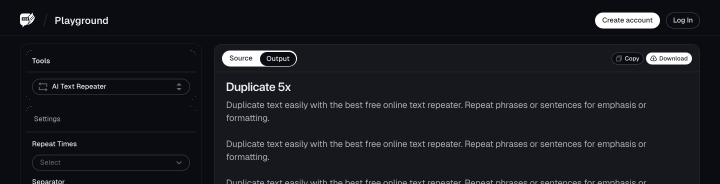
Text Repeater Tool is easy to use because, as simply as it sounds, you input the desired text in its input slot, specifying how many times you want it repeated; the tool then gives the repetition result in a trice. The copied repeated text can be used in messages, social media posts, or on any other platform when repetitive text is required.
Some of its salient features are ease of operation, fast processing, and handling of variable text types, even those with emojis and special characters. By default, no installation is required; thus, it becomes accessible from any device connected to the internet. The repetition tool works well for users who can easily create repeated patterns or sequences.
Benefits of Using the Text Repeater Tool
1. Saving Time and Effort
One of the key benefits of the Text Repeater Tool is that it saves time and effort by giving repeated text on its own. Instead of having to copy and paste repeatedly, you just need to input it once, adjust how many times you want it to repeat, and let the tool do the rest. It comes in handy in some tasks where the content is repetitive, saving you with more critical work.
2. Improving Efficiency
The Repeater Tool will hugely enhance efficiency, especially with tasks that require repetition and may take a lot of time when done manually. Whether creating social network posts, testing software, or crafting repeated messages, the tool speeds up the process to complete your work faster. It, in turn, allows you to be productive and get more done quickly.
3. Ensuring Consistency in Repeated Text
Consistency is key when one has to repeat text, whether in professional matters or even for those creating patterns with symbols or emojis. The Text Repeater Tool ensures the text repeated is the same in any instance, without mistakes or variations, which sometimes is required. Using the tool makes you avoid the chances of faulty repetition that tends to happen manually, ensuring the output is always consistent and polished.
Features of the Text Repeater Tool
1. Customizable Repetition Count
One of the cool features of the text repeater tool is the possibility of setting up the number of times you want to repeat the generated text. You can easily do that using the button provided, either to a low quantity or hundreds of times, and that makes it easy to create just the right amount of the same content that one needs. Things can be easily repeated far and beyond to cater to the needs of the message, social content, or other requirements.
2. Ease of Use
The text repeater tool's design is user-friendly, so even people with little or no technical know-how can access it. The interface allows one to put text in the box, set the number of repetitions, and instantly get the output with just a few clicks. That ensures the design is simple so anyone can use the tool without much effort or confusion.
3. Compatibility With Different Devices and Platforms
The fully optimized text repeater tool can run on all devices: desktops, smartphones, and tablets. Since it is an online-accessible program, you can freely use it on any device, no matter the operating system, just as long as you can access the internet. People find it convenient to use this cross-platform-compatible tool anytime, anywhere—whether working on a computer or the run with a mobile device.
How to Use the Text Repeater Tool
Step 1: Enter Your Text
Type or paste the text you want to repeat in the designated box.
Step 2: Customizing the Tool's Setting
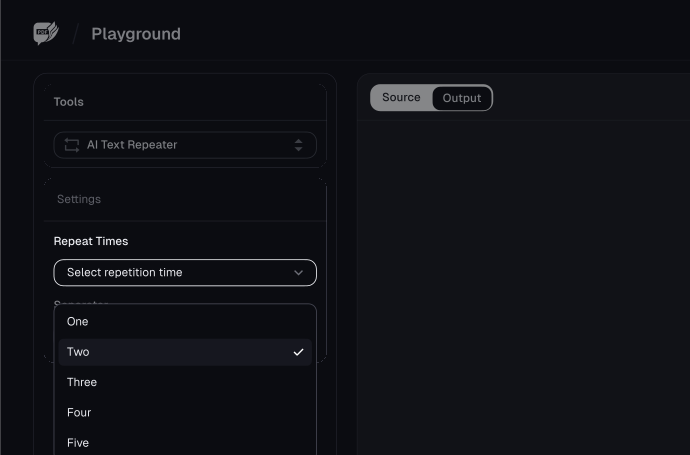
Once you've inputted the text, you can customize the tool settings by specifying the number of times you want the text repeated using the provided options (from 0 to any number).
After setting the repetition count, the next step is to input a separator. This separator adds a character or space between repeated instances. You could use , (comma), | (pipe), or (new line).
The next step is to choose the Add New Line or Add Space option to determine how the tool will generate the result.
Step 3: Generate Repeated Text
Once you've customized the settings, click the "Generate" button to create the repeated text.
Step 4: Copy the Repeated Text
After the tool generates the repeated texts, copy the text to your clipboard and save it as a file for later use.
Use Cases of the Text Repeater Tool
The Text Repeater Tool is versatile and can be used in many ways to meet different needs. Here are some of its common uses:
1. Creating Repetitive Messages
It is the best tool for generating repetitive messages. This may include sending messages involving repeated phrases, such as "Good morning!" or "Happy Birthday!" many times to be more fun and engaging for the recipient.
2. Social Media Posts
They leverage the tool to create captivating posts or comments on social media by repeating text, emojis, or hashtags. This brings out the posts and, hence, easily catches the attention.
3. Generating Patterns with Symbols and Emojis
Generating long patterns required for posting creative quotations or giving a textual ornamented touch is easy. It will help make creative designs in chats or social media platforms.
4. Testing and Coding
The Text Repeater Tool would be beneficial for developers and testers to instantly create repetitive text for things like input fields, character limits, or the responses of systems.
5. Spam Message Simulation
This tool can simulate spam messages by duplicating certain words, phrases, or symbols many times. These are usually applied to test the spam filter or for fun spam messages to tease friends.
6. Learning and Education
This tool would be used for teachers and students to create repeated lines for reinforcement in practice exercises, with writing drills or memorizing phrases to reinforce learning interactively.
7. Creative Writing and Arts
A writer or any digital artist might use it to generate repeated texts for poetry, some form of artwork, or creative projects requiring duplicated lines or patterns.
8. Creation of Promotional Content
The tool will enable marketers to create repeated promotional catchphrases easily or calls to action in advertisements and marketing material rather than manually repeating the same thing.
Conclusion
FAQs
Explore more related tools
Enhance your writing with these complementary tools.

List Randomiser
Our List Randomizer creates dynamic, randomized lists tailored to your needs.

Cursive Font Generator
Our Cursive Font Generator transforms ordinary text into beautifully flowing cursive.

PDF Splitter
Divide PDF documents into separate files, saving you time and streamlining your document management tasks.