Paraphrasing with AI
AI Paraphrasing Tool
Quickly rephrase your text with our free AI Paraphrasing Tool. It’s an easy-to-use tool that helps you create clear and polished content in no time.
Overview
A paraphrasing tool is designed to rephrase your text in your own words but preserves the original message; thus, it remains as an important tool for so many writing tasks. In essence, its work deals with the improvement of clarity, readability, and uniqueness of what you write.
No matter if you are a writer working on academic writing or creating content or in the corporate setting where you are trying to pen professional documents, this small tool may turn out to be very useful at times when you need to word things differently. By paraphrasing words as appropriate synonyms and changing the sentence structures, it keeps your writing concise, engaging, and plagiarism-free. This makes it an invaluable resource for anyone looking to improve their writing quality and efficiency.
In this article, you’ll get to learn how to use the AskYourPDF paraphrasing tool.
What is Paraphrasing?
Paraphrasing is rewriting what others wrote about the issue, their idea, and information in one's own words without changing the original meaning.
A paraphrase generator can be a tool that will help to do the work by replacing some of the words with synonyms and even altering the structure of sentences in doing so.
Such tools may help to make your text shorter, clearer, or more appropriate for your audience. The ability to paraphrase is very important in professional communication and academic writing.
Benefits of the Paraphrasing Tool
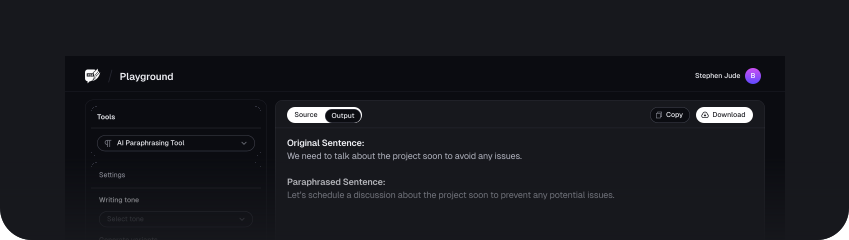
1. Improving Writing Quality
A paraphrasing tool will enhance your writing with text that is not only readable but more engaging, yet at the same time, grammar error-free, without any kind of sacrifice on the quality of your content.
This tool does so by picking up appropriate synonyms, restructuring sentences quite naturally, and rephrasing content in such a professional way that most of the time, it surpasses many professional writers' efforts.
2. Avoiding Plagiarism
This can damage a writer's reputation and even his career. Fortunately, this paraphrasing tool enables one to come up with original content, hence eradicating plagiarism problems.
The assurance you get is that the text from this tool will be authentic. You may also check our plagiarism tester for further assurance of uniqueness.
3. Saving Time
Paraphrasing content can be one of the most tiring and time-consuming chores. It simply means that you have to read a whole text, understand its main ideas, and then write it in your own words.
This paraphrasing tool is actually designed to make things easier by quickly and selflessly offering new content online without you having to put much effort into typing something yourself. Just upload your text, and voila. You get rephrased content with equal ease and speed.
4. Create Appealing Content
Paraphrasing tool is beneficial as it lets you create appealing contents. This means that, to capture the interest of your audience, content ought to use the right vocabulary, have a good tone, and be engaging.
You can use our online paraphrasing tool to create outstanding content that effectively catches and retains attention from your targeted audience.
How to Use the Paraphrasing Tool
Step 1: Input the Text
To get started, type or paste the text you want to paraphrase in the box provided.
Step 2: Choose the Writing Tone
Once you've pasted your text in the box, the next step is to choose the writing tone you want the paraphrased text to be in.
There are 4 writing tones you can choose from—Funny, Inspirational, Casual, and Serious.
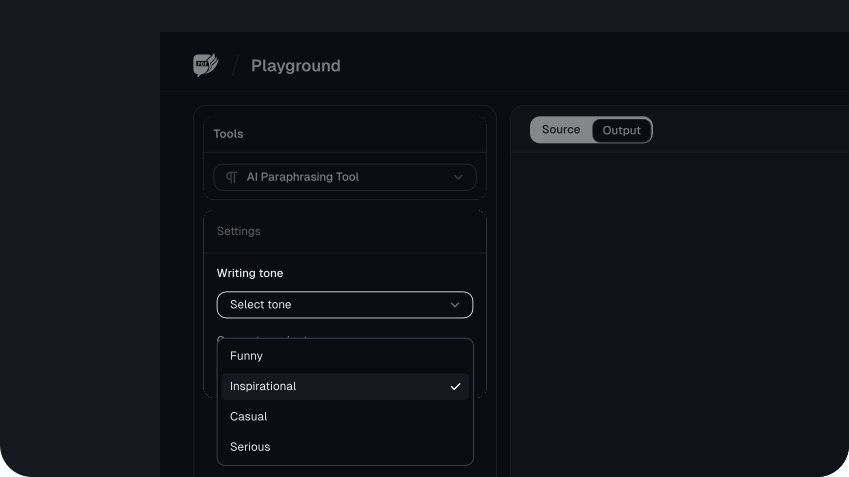
Here’s a breakdown of these writing tones on what they’re all about and how you can use them:
| Writing Tones | Descriptions | Suitable Application |
|---|---|---|
| Funny | Light-hearted, humorous, and entertaining. Uses jokes, wit, or playful language. | Blog posts, social media updates, comedy scripts, casual articles |
| Inspirational | Uplifting, motivating, and encouraging. Aims to inspire or provide hope. | Motivational speeches, self-help books, inspirational articles, personal development content |
| Casual | Relaxed, informal, and conversational. Mimics everyday speech and language. | Personal blogs, informal emails, social media posts, friendly communication |
| Serious | Formal, professional, and authoritative. Maintains a respectful and thoughtful tone. | Academic papers, professional reports, formal letters, serious news articles |
Step 3: Select the Variants
The next step is to select variants. This option allows you to choose the number of versions or variations of the rephrased text it is going to generate.

Here what each option means:
| Variant Options | Suitable Application |
|---|---|
| 5 variants | Generates 5 different versions of the rephrased text. |
| 10 variants | Generates 10 different versions of the rephrased text. |
| 15 variants | Generates 15 different versions of the rephrased text. |
| 20 variants | Generates 20 different versions of the rephrased text. |
The higher the number of variants you pick, the more the rephrased options you'll get to choose from to find the one that best fits your needs.
Step 4: Generate Paraphrased Text
Once you've chosen the writing tone and the variants, the next step is to generate the paraphrased text.
To do this, click on the ‘Paraphrase’ Text button.
Step 5: Review and Edit
Once the AskYourPDF paraphrasing tool paraphrases your text, you can read through and edit it however you like to suit your preference.
The tool gives you the option to personally edit the text. You can copy the text and edit it in a word document. You can also choose to edit in the tool by clicking on Edit using our Editor.
If you would like to avoid your poem being flagged for being AI-written, you can click on the Humanize button to prompt AskYourPDF to work on it.
Conclusion
FAQs
Explore more related tools
Enhance your writing with these complementary tools.

Stylish Text Generator
Instantly transform ordinary text into captivating, creative styles.

Weird Text Generator
Transform your text into weird and wonderful styles. Express yourself creatively.

Glitch Text Generator
Our tool lets you add a digital twist to your words and adjust the glitch craziness level for a unique effect.