Smart email writer with AI
AI Email Writer Tool
Streamline your email writing process with our AI Email Writer, generate contextually relevant, engaging emails.
Overview
The Email Writer Tool is an advanced AI-powered application that simplifies the process of writing emails. It assists the user in creating effective and polished email content quickly, be it for business, marketing, or personal use. It offers elaborate features in customizable templates, automatic text generation, and integrated grammar. It also spell-checks, so it has become one of the most valuable tools for frequent email users.
AI contemporainizes email writing with efficiency, accuracy, and personalization. The Email Writer Tool saves you time, keeps the tone of every email even, and customizes the message to whom it's addressed. The message will be engaging without losing the professionalism of routine business correspondence to personal marketing campaigns; the approach has been simplified with the help of an Email Writer Tool to boost productivity and enhance quality.
What is the Email Writer Tool?
The Email Writer Tool is software or an online tool that helps users draft and compose emails quickly and effectively. It usually has options for email templates, automatic text generation, and customization features for professional email communication.
This tool is highly valued, specifically when one needs to frequently send emails, whether for business, marketing, or personal correspondence. This Email Writer Tool can save time, ensure consistent messages, and increase the quality of emails. This tool also has built-in grammar and spell-check features that ensure error-free and polished emails before sending them.
How to Use the Email Writer Tool
Step 1: Inputting Email Details
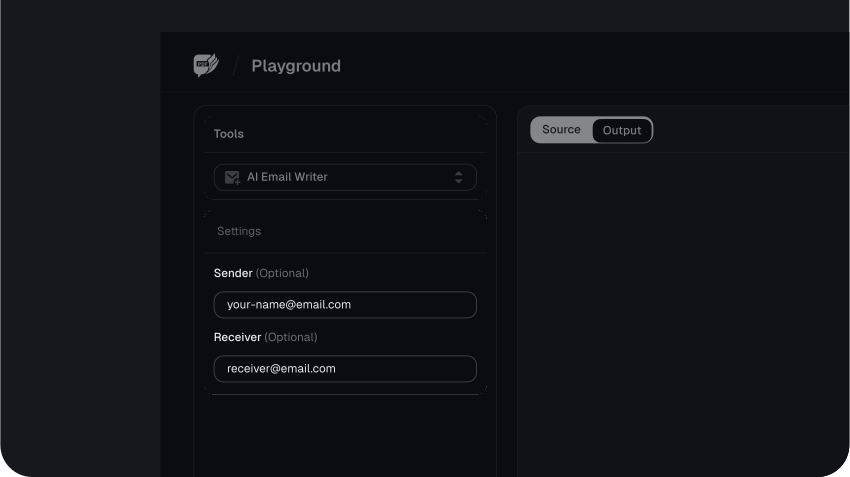
The first step when using the AskYourPDF email writer is to input the sender's and receiver's email addresses. Although this is optional, it helps the tool generate a more personalized email.
After filling out the sender and receiver addresses, you can choose the length of your email. The tool offers Very Short, Short, Medium, Long, and Very Long options.
Once you've chosen the length of the email, you'll need to fill in the text box with the purpose of your mail. The more detailed you are, the better the tool's output.
Step 2: Generating the Email
Once you’ve filled in all your email details, click on Write Mail, and the tool will immediately start generating your email to suit your requirements.
Wait a few seconds, and the tool will promptly generate the mail.
Step 3: Generate Repeated Text
With the generated mail, you can click the Humanize button at the top right corner of the output box to prompt the tool to rewrite it and add a more human touch.
You can also click on the Copy icon beside the Humanize button to copy the mail and paste it into a blank worksheet like a blank document.
From there, you can review the mail and edit it to suit what you need it for better.
Here are some useful tips for reviewing and editing AI-generated emails to ensure they align with your needs and preferences:
1. Review the Content for Relevance
Start by reading through the AI-generated email, ensuring that it has pointedly addressed the recipient's definite needs. Confirm whether all the key points are suitable and that the email wants to avoid any detail. Add or eliminate details to improve the message if it lacks something or the context is wrong.
2. Customize Personalization Details
Even though most of these cases are personalized by AI, it will be essential to double-check the personal touches, such as names, titles, and company information you mention. You can also personalize the specific references, adding anecdotes to make the email seem real and intimate to the recipient.
3. Adjust the Tone and Style
See to it that the tone of the email is appropriate for your intention—it can be formal, friendly, or persuasive. If the generated tone isn't right, tweak the wording, sentence structure, and words you used for a feel-better representative of your voice or your brand's personality.
4. Check for Clarity and Conciseness
Read your mail to ensure that it is clear and easily understood. Eliminate all unnecessary jargon, redundant sentences, or phrases that might confuse the reader. A brief email will ensure the reader's attention is retained, and your point is put forward.
5. Proofread for Grammar and Punctuation
It is always essential to manually proofread grammatical, spelling, and punctuation errors, while AI tools will be accurate. Check the flow of sentences for consistency and coherence to ensure the text is smooth and professional.
6. Verify the Facts and Data
If there is any fact, figure, or data in this email, ensure that all the information is accurate and current. Incorrect information would hurt your credibility, so it's always good to double-check any statistics or specific claims.
7. Add a Personal Touch
Improve the AI-generated content by adding personal elements like greetings, goodbyes, or references to things that were discussed in previous conversations. These can add a lot of humanity and make the email more personable.
8. Ensure Proper Formatting
Check the formatting of the email. Proper formatting should make the email easy to read and help organize information to guide the reader's eye through the content.
9. Try Different Call-to-Actions (CTA)", text: "If the email has a call-to-action, such as a link, a button, or a request for a response, ensure it is clear, compelling, and linked properly. Clear, compelling, and properly linked items require strong, clear, and obvious CTAs that encourage the receiver to take the desired action.
10. Read Aloud for Flow
You can read your email out loud to yourself. This way, you will notice awkward phrasing or those areas in the text that do not flow well. That way, it ensures the email is engaging and conversational, just like you're talking to the listener.
11. Keep Audience Sensitivity in Mind
Please use appropriate language, style, and approach in your email that is respectful to your audience. Be aware of different and possible formalities and anything that could be sensitive for the other party and may affect how your email is perceived.
Benefits of Using the Email Writer Tool
1. Efficiency
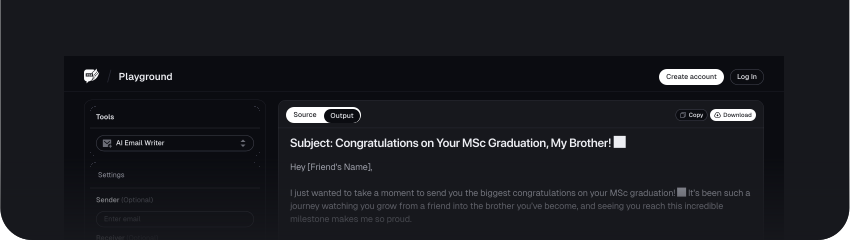
The Email Writer Tool makes it fast to write an email, as it generates the content within no time. You will not have to waste time thinking about what to write; the draft will be ready soon. You can focus on essential tasks and improve your workflow efficiency.
2. Consistency
This tool helps you maintain the same tone and style for one email or hundreds. This way, whether one email or hundreds, you keep the message uniform and the branding the same across all of them. In this consistency, you can uphold your brand's voice across each communication: quality and professionalism.
3. Personalization
The New Email Writer Tool could add a personal touch to your emails based on what you feed in. It drafts messages that seem more involving and befitting to the reader by using specific particulars, like their names or preferences. Personalization helps build a connection with your audience.
4. Accuracy
With built-in grammar, spelling, and punctuation checks, the tool ensures that your emails are accurate and error-free. This attention to detail enhances the professionalism of your communications and reduces the risk of sending out messages with mistakes.
5. Time Saving
Save yourself from time-consuming drafting with swift AI email writing. Instead of crafting emails, that well-written message could be prepared in seconds rather than minutes upon minutes.
6. Increased Productivity
Using AI to handle writing emails would save you time to stay more engaged in value-adding activities. It might eventually increase the productivity level because one might not be busy composing individual emails.
7. Scalability
Our Email Writer Tool can effectively handle a large influx of emails at once. Be it any—small entrepreneur or a big corporation—it changes as per your needs and caters easily to everything from individual emails to bulk email campaigns.
8. A/B testing
Most AI email writers allow for running A/B testing so that you can test different email formats or variations of the content. This way, you can determine the approach that clicks most with your audience, resulting in high engagement and conversion.
Use Cases of the Email Writer Tool
1. Marketing Campaigns
The Email Writer tool is tailor-made for writing content for marketing campaigns. It allows businesses to write emails that get engraved on customers, raise interest in products, or create curiosity about the existence of some services. It allows marketers to get campaigns out faster and in front of more eyes by creating compelling promotional messages in no time.
2. Customer Support
It usually permits the creation of polite and responsive answers to common questions ordered from clients. It will enable the provision of answers to clients on time and with very consistent responses to clients' queries. The tool is also helpful in ensuring that supporting teams respond effectively to a high number of emails without compromising the quality of their responses.
3. Business Correspondence
The Email Writer Tool prepares documents for formal organizational communication, such as meeting invitations, follow-up emails, internal memos, etc. It helps ensure the proper tone and clarity of content to facilitate healthy communication both within and outside the organization.
4. Sales Reach Out
It can be used for personalizing outreach emails, loaded with relevance, so they truly resonate with your leads. The tool helps salespeople create messages customized with things like an individual's name or company, and it makes such messages feel more unscripted for higher chances of eliciting positive responses.
5. Bulletins
This tool can also generate content for newsletters on company updates, industry news, or special announcements. With the Email Writer Tool, you get informative content, keeping your subscribers interested and well-informed at the same time.
6. Event Invitations
A field where this would be useful is event organization, where effective communication is necessary. The Email Writer Tool will prepare compelling invitation emails for you. These will be customized and contain your event details, information on how to RSVP, and personalized messages to encourage them to attend.
7. Follow Up Emails
The Email Writer Tool is great for following up with a client, customer, or member, writing a kind reminder or thank-you note, or supplying additional information to ensure your follow-up messages are professionally done promptly.
8. Internal Communications
The tool can be used to create communications regarding updates, announcements, or reminders that should be relayed to the organization's staff. The tool supports providing the right communication within the organization by maintaining the right tone and clear information delivery.
9. Content Sharing
It enables one to share articles, reports, or some content via email by creating snappy, engaging messages that summarize the information and stimulate reader response that this is something you want to open or click and go to retrieve your copy.
10. Feedback Requests
This tool is also essential for generating emails to obtain customer, client, or employee feedback. Through generating polite and engaging messages, this tool oversees an increase in the value-repeating answers.
Conclusion
FAQs
Explore more related tools
Enhance your writing with these complementary tools.

AI Text Generator
Transform ideas into text effortlessly using AI Text Generator. Craft diverse, creative, and engaging content.

AI Paragraph Generator
Generate concise and coherent paragraphs, enhancing the clarity and impact of your content.

OCR PDF Reader
Transform scanned or image-based PDFs into editable and searchable text with our AI powered OCR PDF Reader.

Source Tool
Discover, analyse, and recommend sources of relevant to your needs.